1. text
1) text-align
* 키워드 값
<기본>
text-align: left;
text-align: right;
text-align: center;
<사용안함>
text-align: justify;
예1 )
 <style>
      p {
        background-color: pink;
        margin: 20px;
      }

      .txt1 {
        text-align: center;
      }
      .txt2 {
        text-align: left;
      }
      .txt3 {text-align: right;}
 </style>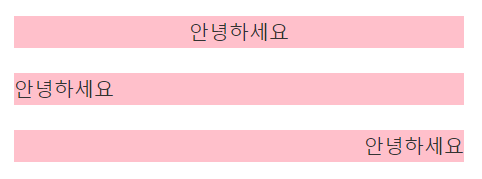
예2 )
<style>

   .txt4 {
        text-align: center;
        /* 블럭안에 텍스트, 인라인, 인라인블럭 모두(자체가) 가운데 처리*/
      }
      span {
        background-color: skyblue;
      }
      strong {
        background-color: skyblue;
      }

</stlye>

<body>
<p class="txt4">
      <span>홍길동</span>
      <strong>안녕</strong>
    테스트
    <button>확인</button>
    <img src="images/m0.jpg" width="150px" alt="" />
    </p>

 </body>
-> 블럭 안에 텍스트, 인라인, 인라인 블럭 모두 (자체가) 가운데 처리
예3 )
<style>

 ul li {
        background-color: yellow;
        text-align: center; }

 ul li h2 {
        background-color: tomato;
        width: 200px;
      }

      ul li p {
        width: 100px;
      }
</style>

<body>
 <ul>
        <li>
            <h2>타이틀</h2>
            <p>설명</p>
        </li>
    </ul>
</body>
-> 블럭요소 자체는 가운데 처리 불가능
그 안에 자식들 : 인라인, 인라인블럭, 텍스트만 중앙 정렬됨
-> 이럴 경우 margin 활용해 중앙 정렬 가능
2) text-indent
3) line-height
: 행간
2. border
1) border 스타일
border-style: none;
border-style: solid; 기본선
border-style: dotted; 점선
border-style: dashed; 살짝 긴 점선
테두리 color
border-color: red; 키워드, 나머지는 컬러수업 때
border-color: transparent; 투명
너비
border-width: thin; px;
2) border 사용 방법 (속기법)
속기법
* 스타일
border: 너비 스타일 색;
border: solid; -> 기본 두께, 색 : 폰트색
* 너비 | 스타일
border: 2px dotted; -> 색 : 폰트색
* 스타일 | 색
border: outset #f33; -> 두께 : 기본두께 2px
* 너비 | 스타일 | 색
border: medium dashed green;
3) 기본 작성법
border: 너비 스타일 색;
border-left : 너비 스타일 색;
border-right : 너비 스타일 색;
border-top : 너비 스타일 색;
border-bottom : 너비 스타일 색;
border : none;
border: none;
border-left : none;
border-right : none;
border-top :none;
border-bottom : none;
예시)
<style>
        /* 공통 */
        div {
            width: 300px;
            height: 100px;
            margin: 30px auto;
            background-color: pink;
            text-align: center;
        }

        .box1 {
            border-top: 3px solid black;
        }
        .box2 {

            border-top: 5px solid red;
            border-right: 5px dashed yellow;
            border-bottom: 5px dotted purple;
            border-left: none;
        }
        .box3 {
            border: 3px solid blue;
        }
        .box4 {
            border: 5px solid black;
            border-bottom: none;
        }
        .box5 {
            border: 5px solid black;
            box-sizing: border-box;
            /* box-sizing: border-box; 안할 경우 피그마 stoke outside 처리랑 동일 */
        }


</style>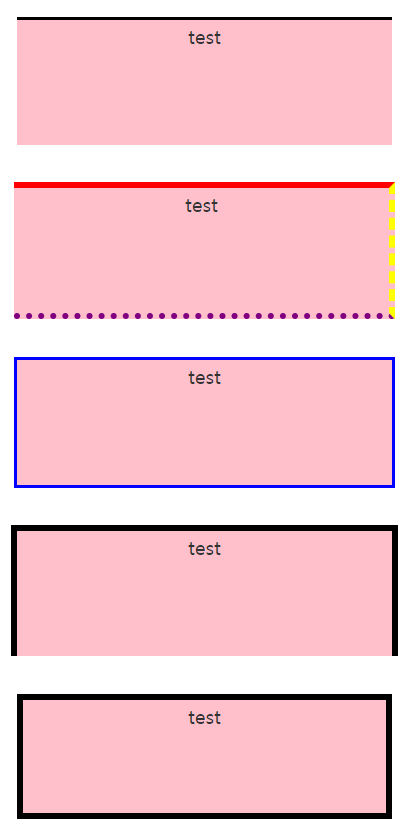
3. font
 <style>
       p {
        border: 1px solid #000;
        padding: 10px;
        margin: 15px;
        text-align: center;
        font-size: 20px;
       }

       .txt1 { font-weight: 100;}
       .txt2 {font-weight: 200;}
       .txt3 {font-weight: 300;}
       .txt4 {font-weight: 400;}
       .txt5 {font-weight: 500;}
       .txt6 {font-weight:600;}
       .txt7 {font-weight: 700;}
       .txt8 {font-weight: 800;}
       .txt9 {font-weight:900;}

    </style>

    <body>
    <h2> 폰트 두께 </h2>
     <!-- p.txt${안녕하세요}*9 -->
     <p class="txt1">안녕하세요</p>
     <p class="txt2">안녕하세요</p>
     <p class="txt3">안녕하세요</p>
     <p class="txt4">안녕하세요</p>
     <p class="txt5">안녕하세요</p>
     <p class="txt6">안녕하세요</p>
     <p class="txt7">안녕하세요</p>
     <p class="txt8">안녕하세요</p>
     <p class="txt9">안녕하세요</p>
    </body>
'CSS' 카테고리의 다른 글
| [css] 단위 (0) | 2024.02.16 |
|---|---|
| [css] 다중클래스 (0) | 2024.02.16 |
| [css] margin, padding (1) | 2024.02.15 |
| [css] 선택자 우선순위 (0) | 2024.02.15 |
| [css] css 문법, 선택자 (1) | 2024.02.14 |


